Smartforms com LINKs

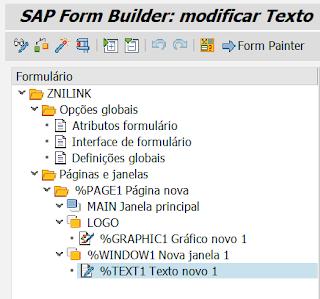

Ativar o objeto
Programa ZNI_PDF_WITH_ALIAS
*&---------------------------------------------------------------------*
*& Report ZNI_PDF_WITH_ALIAS
*&---------------------------------------------------------------------*
*&
*&---------------------------------------------------------------------*
REPORT ZNI_PDF_WITH_ALIAS.
CLASS lcl_smartform DEFINITION.
PUBLIC SECTION.
types: BEGIN OF ty_url, "<= definition copied from LHRRCF00_CALLBACKTOP
name(80),
url TYPE string,
END OF ty_url.
data: gw_job_output_info TYPE ssfcrescl,
gw_output_options TYPE ssfcompop,
gw_control_parameters TYPE ssfctrlop,
gv_fm_name TYPE rs38l_fnam,
gt_urls type standard table of ty_url,
wa_url type ty_url.
METHODS:
constructor importing
smartform type TDSFNAME
language type SFLANGU default sy-langu,
set_url importing name type any url type any,
get_funmod_name returning value(function_module) type rs38l_fnam,
convert_and_save_as_pdf.
ENDCLASS.
CLASS lcl_smartform IMPLEMENTATION.
method constructor.
* Prepare device type for the gw_output_options
clear: gw_output_options.
CALL FUNCTION 'SSF_GET_DEVICE_TYPE'
EXPORTING
i_language = language
i_application = 'SAPDEFAULT'
IMPORTING
e_devtype = gw_output_options-tdprinter.
* Default settings - directly produce output
clear: gw_control_parameters.
gw_control_parameters-no_dialog = 'X'.
gw_control_parameters-getotf = 'X'.
* Determine the function module name
CALL FUNCTION 'SSF_FUNCTION_MODULE_NAME'
EXPORTING
formname = smartform
IMPORTING
fm_name = gv_fm_name
EXCEPTIONS
OTHERS = 4.
clear: gt_urls[].
endmethod.
method set_url.
data: lw_url type ty_url.
* Prepare an alias url. Whenever the alias text is incorporated on the Smartform
* output, it will be changed into a link.
lw_url-name = name.
lw_url-url = url.
APPEND lw_url TO gt_urls.
endmethod.
method get_funmod_name.
data: lv_canc type c.
* First pass the url's to SF_URL:
if not gt_urls[] is initial.
CALL FUNCTION 'HR_RCF_SF_URL_REFRESH_GT'.
CALL FUNCTION 'HR_RCF_SF_URL_PREPARE_CALLBACK'
TABLES
pt_url = gt_urls.
gw_output_options-urlcall = 'HR_RCF_SF_URL_CALLBACK'.
endif.
function_module = gv_fm_name.
endmethod.
method convert_and_save_as_pdf.
data: lv_bin_filesize TYPE i,
lt_docs TYPE STANDARD TABLE OF docs,
lt_lines TYPE STANDARD TABLE OF tline,
lv_guiobj TYPE REF TO cl_gui_frontend_services,
lv_name TYPE string,
lv_path TYPE string,
lv_fullpath TYPE string,
lv_uact TYPE i.
CALL FUNCTION 'CONVERT_OTF_2_PDF'
IMPORTING
bin_filesize = lv_bin_filesize
TABLES
otf = gw_job_output_info-otfdata
doctab_archive = lt_docs
lines = lt_lines
EXCEPTIONS
OTHERS = 4.
CHECK sy-subrc = 0.
* Fetch a filename to store the .pdf file in:
CONCATENATE 'smrt' '.pdf' INTO lv_name.
CREATE OBJECT lv_guiobj.
CALL METHOD lv_guiobj->file_save_dialog
EXPORTING
default_extension = 'pdf'
default_file_name = lv_name
CHANGING
filename = lv_name
path = lv_path
fullpath = lv_fullpath
user_action = lv_uact.
IF lv_uact = lv_guiobj->action_cancel.
EXIT.
ENDIF.
* Download as file in the front end (presentation server)
CALL FUNCTION 'GUI_DOWNLOAD'
EXPORTING
bin_filesize = lv_bin_filesize
filename = lv_fullpath
filetype = 'BIN'
TABLES
data_tab = lt_lines
EXCEPTIONS
OTHERS = 22.
endmethod.
ENDCLASS.
PARAMETERS: p_pix type ZDEFI_TXTMIN_255 VISIBLE LENGTH 60 MEMORY ID PIX.
START-OF-SELECTION.
data: go_smartform type ref to lcl_smartform,
gv_funmod type rs38l_fnam,
lv_url_pix type string,
lv_txt type c LENGTH 100.
create object go_smartform EXPORTING smartform = 'ZNILINK'. "<= your Smartform here !
* The name's listed below should be available as hyperlink in the Smartform. Turn a text into a
* hyperlink as follows: <%W>SAP</>
go_smartform->set_url( exporting name = 'SAP' url = 'http://www.sap.com/' ).
go_smartform->set_url( exporting name = 'ABAP71+' url = 'https://abap71.blogspot.com/' ).
go_smartform->set_url( exporting name = 'Youtube' url = 'https://www.youtube.com/' ).
go_smartform->set_url( exporting name = 'Twitter' url = 'https://www.twitter.com/' ).
lv_url_pix = 'file:///C:/_XXXXXX/Temp/xxxxxx_send_texto_to_memory_04.html'.
lv_txt = p_pix.
perform f_conv_txt_web changing lv_txt.
lv_url_pix = lv_url_pix && '?texto='.
lv_url_pix = lv_url_pix && lv_txt.
go_smartform->set_url( exporting name = 'Copiar' url = lv_url_pix ).
gv_funmod = go_smartform->get_funmod_name( ).
CALL FUNCTION gv_funmod
EXPORTING
control_parameters = go_smartform->gw_control_parameters
output_options = go_smartform->gw_output_options
V_PIX = p_pix
IMPORTING
job_output_info = go_smartform->gw_job_output_info
EXCEPTIONS
OTHERS = 4.
go_smartform->convert_and_save_as_pdf( ).
*&---------------------------------------------------------------------*
*& Form F_SEND_TO_CLIPBOARD
*&---------------------------------------------------------------------*
* text
*----------------------------------------------------------------------*
* --> p1 text
* <-- p2 text
*----------------------------------------------------------------------*
FORM F_SEND_TO_CLIPBOARD .
DATA: lt_mem TYPE TABLE OF char256,
lv_mem type c LENGTH 256,
lv_return_code TYPE i.
lv_mem = 'Teste 02 de envio de dados para a memória do Windows...'.
append lv_mem to lt_mem.
CALL METHOD cl_gui_frontend_services=>clipboard_export
EXPORTING
no_auth_check = abap_true " No authorization check
IMPORTING
data = lt_mem
CHANGING
rc = lv_return_code
EXCEPTIONS
cntl_error = 1
error_no_gui = 2
not_supported_by_gui = 3
no_authority = 4
OTHERS = 5.
IF sy-subrc <> 0.
WRITE:/ 'FAILURE. Exception:' && ` ` && lv_return_code.
ELSE.
WRITE:/ 'Parameters successfully sent to the clipboard'.
ENDIF.
ENDFORM.
*&---------------------------------------------------------------------*
*& Form F_CONV_TXT_WEB
*&---------------------------------------------------------------------*
* text
*----------------------------------------------------------------------*
* <--P_LV_TXT text
*----------------------------------------------------------------------*
FORM F_CONV_TXT_WEB CHANGING P_TXT.
data: lv_strlen type i,
lv_count type i,
lv_des type i,
lv_pos type i,
lv_char type c LENGTH 1.
lv_strlen = strlen( p_txt ).
do lv_strlen times.
lv_des = sy-index - 1 .
if p_txt+lv_des(1) = space.
p_txt+lv_des(1) = '#'.
add 1 to lv_count.
endif.
enddo.
do lv_count times.
REPLACE '#' IN p_txt WITH '%20'.
enddo.
ENDFORM.
*& Report ZNI_PDF_WITH_ALIAS
*&---------------------------------------------------------------------*
*&
*&---------------------------------------------------------------------*
REPORT ZNI_PDF_WITH_ALIAS.
CLASS lcl_smartform DEFINITION.
PUBLIC SECTION.
types: BEGIN OF ty_url, "<= definition copied from LHRRCF00_CALLBACKTOP
name(80),
url TYPE string,
END OF ty_url.
data: gw_job_output_info TYPE ssfcrescl,
gw_output_options TYPE ssfcompop,
gw_control_parameters TYPE ssfctrlop,
gv_fm_name TYPE rs38l_fnam,
gt_urls type standard table of ty_url,
wa_url type ty_url.
METHODS:
constructor importing
smartform type TDSFNAME
language type SFLANGU default sy-langu,
set_url importing name type any url type any,
get_funmod_name returning value(function_module) type rs38l_fnam,
convert_and_save_as_pdf.
ENDCLASS.
CLASS lcl_smartform IMPLEMENTATION.
method constructor.
* Prepare device type for the gw_output_options
clear: gw_output_options.
CALL FUNCTION 'SSF_GET_DEVICE_TYPE'
EXPORTING
i_language = language
i_application = 'SAPDEFAULT'
IMPORTING
e_devtype = gw_output_options-tdprinter.
* Default settings - directly produce output
clear: gw_control_parameters.
gw_control_parameters-no_dialog = 'X'.
gw_control_parameters-getotf = 'X'.
* Determine the function module name
CALL FUNCTION 'SSF_FUNCTION_MODULE_NAME'
EXPORTING
formname = smartform
IMPORTING
fm_name = gv_fm_name
EXCEPTIONS
OTHERS = 4.
clear: gt_urls[].
endmethod.
method set_url.
data: lw_url type ty_url.
* Prepare an alias url. Whenever the alias text is incorporated on the Smartform
* output, it will be changed into a link.
lw_url-name = name.
lw_url-url = url.
APPEND lw_url TO gt_urls.
endmethod.
method get_funmod_name.
data: lv_canc type c.
* First pass the url's to SF_URL:
if not gt_urls[] is initial.
CALL FUNCTION 'HR_RCF_SF_URL_REFRESH_GT'.
CALL FUNCTION 'HR_RCF_SF_URL_PREPARE_CALLBACK'
TABLES
pt_url = gt_urls.
gw_output_options-urlcall = 'HR_RCF_SF_URL_CALLBACK'.
endif.
function_module = gv_fm_name.
endmethod.
method convert_and_save_as_pdf.
data: lv_bin_filesize TYPE i,
lt_docs TYPE STANDARD TABLE OF docs,
lt_lines TYPE STANDARD TABLE OF tline,
lv_guiobj TYPE REF TO cl_gui_frontend_services,
lv_name TYPE string,
lv_path TYPE string,
lv_fullpath TYPE string,
lv_uact TYPE i.
CALL FUNCTION 'CONVERT_OTF_2_PDF'
IMPORTING
bin_filesize = lv_bin_filesize
TABLES
otf = gw_job_output_info-otfdata
doctab_archive = lt_docs
lines = lt_lines
EXCEPTIONS
OTHERS = 4.
CHECK sy-subrc = 0.
* Fetch a filename to store the .pdf file in:
CONCATENATE 'smrt' '.pdf' INTO lv_name.
CREATE OBJECT lv_guiobj.
CALL METHOD lv_guiobj->file_save_dialog
EXPORTING
default_extension = 'pdf'
default_file_name = lv_name
CHANGING
filename = lv_name
path = lv_path
fullpath = lv_fullpath
user_action = lv_uact.
IF lv_uact = lv_guiobj->action_cancel.
EXIT.
ENDIF.
* Download as file in the front end (presentation server)
CALL FUNCTION 'GUI_DOWNLOAD'
EXPORTING
bin_filesize = lv_bin_filesize
filename = lv_fullpath
filetype = 'BIN'
TABLES
data_tab = lt_lines
EXCEPTIONS
OTHERS = 22.
endmethod.
ENDCLASS.
PARAMETERS: p_pix type ZDEFI_TXTMIN_255 VISIBLE LENGTH 60 MEMORY ID PIX.
START-OF-SELECTION.
data: go_smartform type ref to lcl_smartform,
gv_funmod type rs38l_fnam,
lv_url_pix type string,
lv_txt type c LENGTH 100.
create object go_smartform EXPORTING smartform = 'ZNILINK'. "<= your Smartform here !
* The name's listed below should be available as hyperlink in the Smartform. Turn a text into a
* hyperlink as follows: <%W>SAP</>
go_smartform->set_url( exporting name = 'SAP' url = 'http://www.sap.com/' ).
go_smartform->set_url( exporting name = 'ABAP71+' url = 'https://abap71.blogspot.com/' ).
go_smartform->set_url( exporting name = 'Youtube' url = 'https://www.youtube.com/' ).
go_smartform->set_url( exporting name = 'Twitter' url = 'https://www.twitter.com/' ).
lv_url_pix = 'file:///C:/_XXXXXX/Temp/xxxxxx_send_texto_to_memory_04.html'.
lv_txt = p_pix.
perform f_conv_txt_web changing lv_txt.
lv_url_pix = lv_url_pix && '?texto='.
lv_url_pix = lv_url_pix && lv_txt.
go_smartform->set_url( exporting name = 'Copiar' url = lv_url_pix ).
gv_funmod = go_smartform->get_funmod_name( ).
CALL FUNCTION gv_funmod
EXPORTING
control_parameters = go_smartform->gw_control_parameters
output_options = go_smartform->gw_output_options
V_PIX = p_pix
IMPORTING
job_output_info = go_smartform->gw_job_output_info
EXCEPTIONS
OTHERS = 4.
go_smartform->convert_and_save_as_pdf( ).
*&---------------------------------------------------------------------*
*& Form F_SEND_TO_CLIPBOARD
*&---------------------------------------------------------------------*
* text
*----------------------------------------------------------------------*
* --> p1 text
* <-- p2 text
*----------------------------------------------------------------------*
FORM F_SEND_TO_CLIPBOARD .
DATA: lt_mem TYPE TABLE OF char256,
lv_mem type c LENGTH 256,
lv_return_code TYPE i.
lv_mem = 'Teste 02 de envio de dados para a memória do Windows...'.
append lv_mem to lt_mem.
CALL METHOD cl_gui_frontend_services=>clipboard_export
EXPORTING
no_auth_check = abap_true " No authorization check
IMPORTING
data = lt_mem
CHANGING
rc = lv_return_code
EXCEPTIONS
cntl_error = 1
error_no_gui = 2
not_supported_by_gui = 3
no_authority = 4
OTHERS = 5.
IF sy-subrc <> 0.
WRITE:/ 'FAILURE. Exception:' && ` ` && lv_return_code.
ELSE.
WRITE:/ 'Parameters successfully sent to the clipboard'.
ENDIF.
ENDFORM.
*&---------------------------------------------------------------------*
*& Form F_CONV_TXT_WEB
*&---------------------------------------------------------------------*
* text
*----------------------------------------------------------------------*
* <--P_LV_TXT text
*----------------------------------------------------------------------*
FORM F_CONV_TXT_WEB CHANGING P_TXT.
data: lv_strlen type i,
lv_count type i,
lv_des type i,
lv_pos type i,
lv_char type c LENGTH 1.
lv_strlen = strlen( p_txt ).
do lv_strlen times.
lv_des = sy-index - 1 .
if p_txt+lv_des(1) = space.
p_txt+lv_des(1) = '#'.
add 1 to lv_count.
endif.
enddo.
do lv_count times.
REPLACE '#' IN p_txt WITH '%20'.
enddo.
ENDFORM.
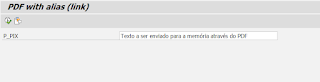

PDF aberto


Detalhes:
Esse programa recebe um determinado texto (que será copiado para a memória do windows), através de um PDF (smartforms) gerado.
Ao clicar no link o PDF será aberta uma página no navegador informando que o texto foi copiado para a memória.
Ao clicar no link o PDF será aberta uma página no navegador informando que o texto foi copiado para a memória.
Obs.: Tem classe que envia os dados para a memória de maneira bem simples, mas você precisa estar logado (on-line) no SAP (programa ou aplicação). De maneira independente, através de um PDF, essa foi a maneira que encontrei.
